
In m-Path, you can create questionnaires in any language for participants. You simply write your questions and answer options in the language of your choice.
The app in 25 languages
Besides your own questionnaires, the m-Path app itself is translated into 25 languages. This means that the app interface, all menu items and default texts in the app are available in each of these languages.
When a participant whose phone is set to one of the available languages opens the m-Path app for the first time, all default texts are automatically shown in that language.
These are the currently available languages:
- Chinese (Simplified)
- Chinese (Traditional)
- Croatian
- Danish
- Dutch
- English
- Finnish
- French
- German
- Greek
- Hebrew (right to left)
- Hungarian
- Italian
- Japanese
- Norwegian
- Polish
- Portuguese
- Russian
- Slovenian
- Spanish
- Swedish
- Turkish
- Ukrainian
- Vietnamese
- Antwerps (a beautiful Dutch dialect)
Translated by researchers
Most translations of the app were made by researchers who wanted to use m-Path in their own population with a specific language.
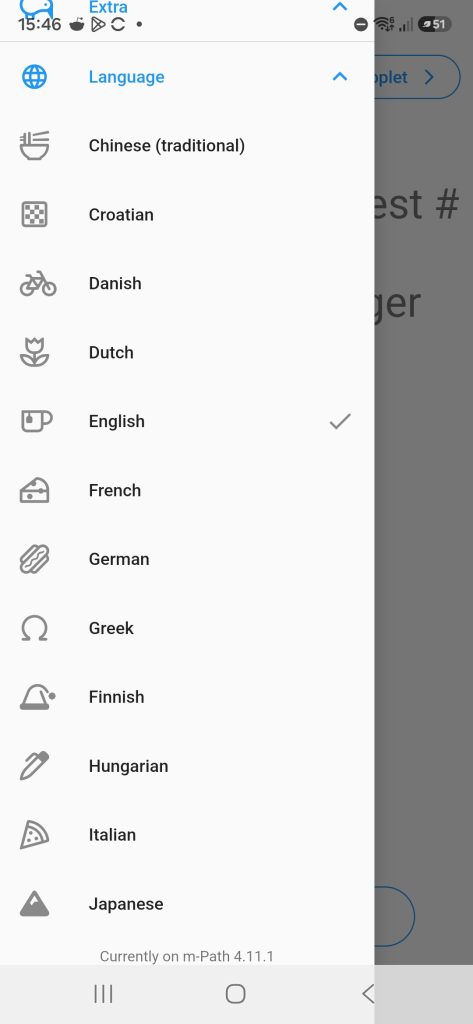
Translate the app to a new language
We are always happy if a researcher wants to translate the app to a new language.
You can find the translation file of the app here: app_en.txt. If you would want to translate the app into a new language (e.g. for your research), you need to translate this file. For example for Vietnamese, the first three entries would become something like this (according to Google Translate):
"welcome": "Chào mừng",
  "@welcome": {
    "description": "Welcome, someones name!",
    "type": "text",
    "placeholders": {}
  },
  "start": "Bắt đầu",
  "@start": {
    "description": "start button",
    "type": "text",
    "placeholders": {}
  },
  "questionnaire": "bảng câu hỏi",
  "@questionnaire": {
    "description": "questionnaire",
    "type": "text",
    "placeholders": {}
  },
Additionally, you can choose an icon from https://fontawesome.com/search to represent your language in the app (see image above).
It might help to go through the app a bit to understand better where the text will be used.
Once we receive the translation, we can quickly put it in a beta version of the app for you to test. If you are happy with the translation it takes us approximately a month to put the translation into the production app.
Running a multi-language study
m-Path has been used in many multi-center, multi-country and multi-language studies. To run a study in several languages, we recommend the following steps:
- Create your questionnaires in each language. Make a separate version of each questionnaire for every language in your study.
- Create a protocol for each language. Each protocol schedules the questionnaires in its own language.
- Ask for the preferred language at the start. Add a question about the participant’s preferred language at the beginning of the intake questionnaire. Because you don’t know the participant’s language yet, write this question in all languages of your study.
- Show the rest of the intake in the chosen language. Use conditional questions to show the remaining intake questions in the preferred language. Group the questions for each language in a container, so you only need to set the condition once per language.
- Apply the matching protocol automatically. Apply a protocol based on the participant’s preferred language, so each participant receives the questionnaires in their own language.
Language of the dashboard
The researcher dashboard is currently only available in English.